Vela
Personal build · one household

Vela

Money you actually hold.

It answers one question, every morning, before you’ve had coffee.

Not “how did last month go”. Not “are you under budget”. Just: what can I spend today, without breaking anything that’s already promised?

Safe to spend
£2,418
For the rest of the month
Safe today
£219.82
This week
£1,538.74
Everyday Current never confirmed · Spending never confirmed
Real screens from the app · every figure is sample data, not real finances
Why I built it

The spreadsheet was right and still useless.

For years my money lived in an Apple Numbers file. It was meticulous. Income at the top, every fixed cost underneath, a tidy little surplus at the bottom. And every single month it told me I had money spare while my account quietly told me something different.

The spreadsheet wasn’t wrong. It was answering a different question. It knew what my month should look like. It had no idea what was actually sitting in my account on a Tuesday afternoon with rent still to come out.

That gap is where budgeting apps lose people. They show you a plan and let you feel fine, right up until a direct debit lands and the plan turns out to have been fiction. I didn’t want a better plan. I wanted the truth about today.

So I built Vela. It starts from money I can genuinely touch, subtracts everything that must leave before I’m paid again, and shows me what’s left. It is a smaller, more honest number than any budget I ever wrote, and it’s the only one I’ve been able to trust.

— the person who built it

Cash-based, not budget-based

Money you hold, minus what must leave.

Most apps compute headroom as income minus planned spending. That number exists in a spreadsheet, not in your account. It counts a salary that hasn’t landed and forgives a bill that lands tomorrow.

Vela starts from balances in accounts you can actually spend from. It subtracts every commitment leaving before your next pay date, and it holds back whatever your ring-fenced bill accounts are still short of.

Income that hasn’t arrived never counts. A bill due after payday isn’t held against today — the money for it hasn’t been earned yet. The old income-minus-outgoings figure still exists, but it’s demoted to Headroom on the monthly plan where it belongs.

✓ The number goes down when you spend and up when you’re paid, exactly like your bank does. Nothing to reconcile in your head.
Spendable balancesCurrent + spending accounts only
£3,182.00
Commitments before paydayBroadband, investments, car insurance
− £634.00
Bill account shortfallRing-fenced, still underfunded
− £130.00
Next salaryHasn’t arrived — doesn’t count
£0.00
Safe to spend
£2,418.00
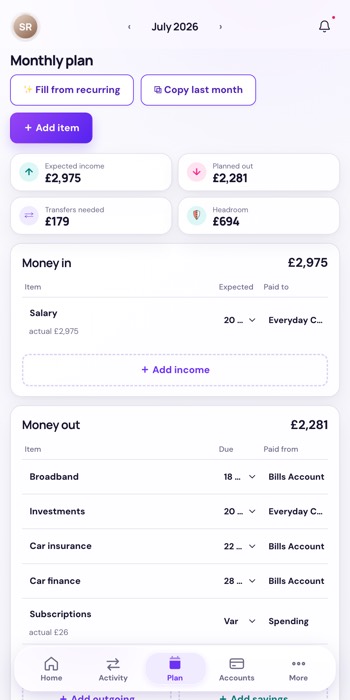
Vela Monthly plan showing Expected income, Planned out, Transfers needed and Headroom
Headroom £694 — the old income-minus-outgoings figure, demoted to the plan where it belongs.
The Daily control centre

One glance. One question answered.

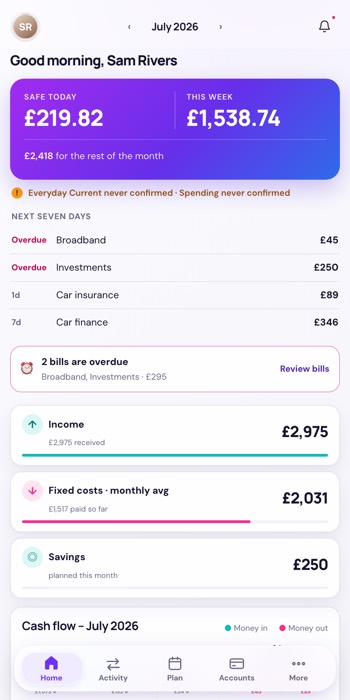
Home doesn’t open on charts. It opens on Safe today and This week — your remaining cash divided honestly across the days until you’re paid, so a good Monday visibly buys you a better Saturday.

Underneath sits the next seven days: what’s leaving, when, and whether it clears. Then exactly one recommended action — the single most useful thing you could do about your money right now. Not a list of twelve. One.

None of it is a static budget line. A real forecast runs your actual balances forward to payday, so “safe for the rest of the month” is a projection from exactly where you stand today — and it corrects itself as money moves.

Everything else — the plan, the registers, six years of transactions — is still there when you want it. It just isn’t what greets you.

✓ The whole point is that you close it after four seconds. Answering the question and getting out of the way is the feature.
Vela Home screen: Safe today and This week, the next seven days, and an overdue bill notice
Home. Safe today, this week, what’s coming, one thing to do.
Freshness is first-class

A number resting on a guess says so.

Some accounts sync themselves. Others are still typed in by hand. An app that renders both in the same confident font is quietly lying to you, and you won’t notice until the day it matters.

So every figure carries its provenance. A balance you last edited on Friday is labelled as a balance you last edited on Friday. If it drifts far enough out of date to distort the headline, that isn’t a footnote — it gets promoted into the recommended action and asks you to check it.

Vela never implies a hand-typed balance is live. It would rather show you a slightly awkward number with an honest caveat than a clean one you can’t audit.

✓ You always know how much to trust the number you’re looking at — which is the difference between a tool and a decoration.
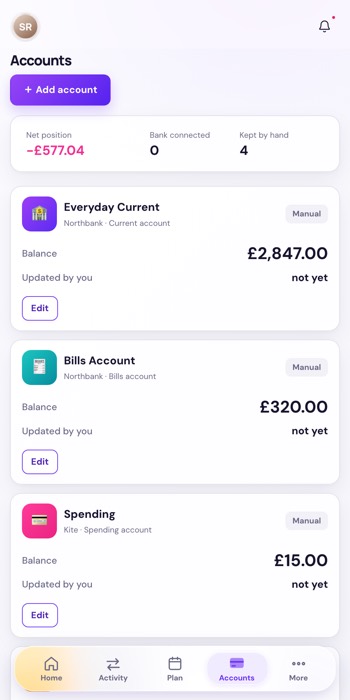
Vela Accounts screen: four accounts kept by hand, none bank-connected, each labelled Manual
Every balance carries how it got there — Manual, and when you last touched it.
Alerts you can act on

It only interrupts you when you can do something.

“You spent £4.20 at a coffee shop” is not an alert. It’s a notification habit. You already knew; there is nothing to do; the only thing it achieved was teaching you to ignore the next one.

Vela raises a notice when there’s an action attached and time to take it. A bill account that won’t be funded by its deadline. A forecast that has quietly deteriorated since you last looked. A manual balance stale enough to be distorting the headline.

And it stays consistent with itself: alerts are ranked once, so the bell and the recommended action on Home can never tell you two different stories. Push is best-effort and holds during quiet hours. The app is the source of truth; the phone buzz is a courtesy.

✓ Few enough alerts that you still read them — which is the only metric that matters.
Vela Home: the freshness line, the next seven days and an overdue bill notice
The real thing: a freshness warning, what’s leaving next, and one overdue bill with an action attached.
Every tab, briefly

What’s behind the other four buttons.

The four ideas above are why Vela exists. This is the rest of it — the registers that feed those numbers, and the settings that decide how they look and when they interrupt you.

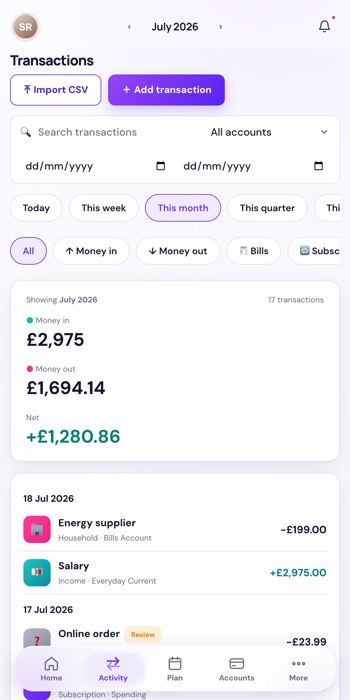
Vela Transactions screen with search, date filters and a running money in, money out and net summary
Activity

Every transaction, searchable

Search, date ranges, and one-tap windows for today, this week, this month or this quarter — then filter to money in, money out, bills or subscriptions. A running money in, money out and net sits above the list.

Rename anything and the new name sticks: a re-sync updates the amount and the date but leaves your name alone. Anything the app is unsure about gets a Review chip rather than a silent guess.

Six years of history came with it. Every transaction back to 2019 was imported from the spreadsheet Vela replaced — so the search box reaches your whole financial history, not just the weeks since you started.

And it shows the same columns your old sheet did — time, type, location, even the emoji — or hides the ones you never read. It’s still your table; Vela just keeps it current.

Vela Monthly plan showing expected income, planned out, transfers needed and headroom
Plan

The month on paper

Expected income, planned out, transfers needed and Headroom — the old income-minus-outgoings figure, kept where it’s honest, well away from the headline.

Build it in one tap with Fill from recurring or Copy last month. When a real payment arrives and matches a planned item, it replaces that line rather than adding to it, so nothing is ever counted twice.

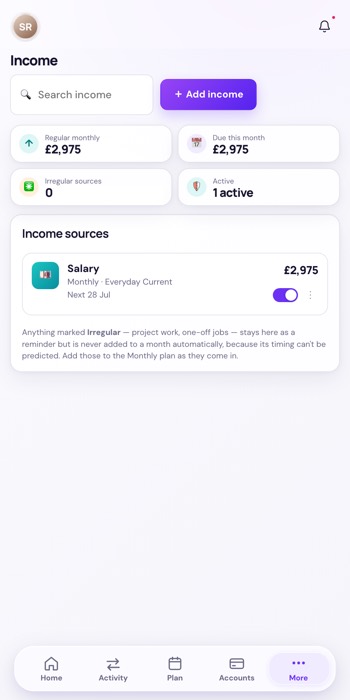
Vela Income register listing recurring income sources
More › Income

What’s coming in, and when

The register of what you’re paid. Only recurring income can set the safe-to-spend horizon — a one-off can’t move your payday, because it isn’t one.

A payday rule handles the awkward months: pay that lands early because the date fell on a weekend, and the December run that arrives before Christmas rather than at month end.

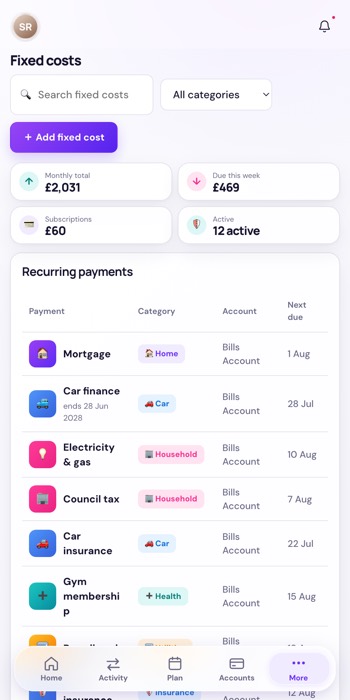
Vela Fixed costs register listing recurring bills and the account each is paid from
More › Fixed costs

The bills that repeat

Everything that goes out on a schedule, with which account pays it — that last part is what makes ring-fencing work, because it’s how Vela knows a bills account is short before the direct debit bounces.

Set here once, and it feeds the plan, the next-seven-days list and the funding warnings without being retyped.

Vela Accounts screen showing net position and each account labelled with how it is kept up to date
Accounts

Where the money actually is

Net position across everything, and a count of what’s bank connected versus kept by hand — stated plainly, because the difference decides how much to trust the headline.

Each account carries its own freshness line, and a balance you typed says so and shows its age.

The everyday account connects through Monzo and keeps itself current in the background — webhooks as they happen, a catch-up sweep to be sure. The rest are still by hand, and Vela never blurs the two.

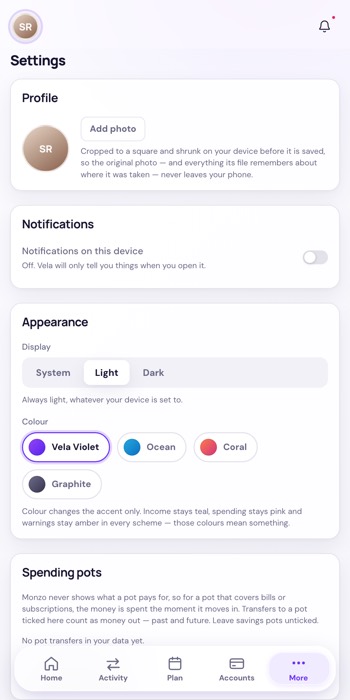
Vela Settings screen with profile, notifications toggle, display mode and four colour schemes
More › Settings

How it looks, and what it’s allowed to say

Light, dark or follow the system, plus four accent schemes. The accent is all that changes: income stays teal, spending stays pink and warnings stay amber in every scheme, because those colours carry meaning.

Also where spending pots are declared — for a pot whose card the bank won’t itemise, the money counts as spent the moment it moves in.

The bell · every screen

Notifications

The bell carries anything that needs you, ranked once so it can never disagree with the action on Home. It draws only on what the app itself raises — it cannot invent an alert that the figures don’t support.

Web Push can carry the actionable ones to your phone. It holds during quiet hours rather than firing at 3am, and only marks an alert delivered once a device has actually accepted it. The bell is authoritative; push is best-effort.

No screenshot here — the panel opens from the bell, and these screens were captured without a hand on the mouse.


How it works

Three ideas, and everything else follows.

One place for the maths

Every figure — safe-to-spend, funding, forecast, allocation — comes out of a single calculation module. Two screens can’t disagree, because there’s only one answer to disagree about.

Anything that says “now” uses today

Browsing next month must never change what today’s headline says. Live figures derive from the actual date, never from whichever month the app was last left open on.

Matched, never double-counted

When a real transaction is matched to a planned item, it replaces that plan line everywhere at once. Your rent is counted once, whether it’s still expected or already paid.

Being straight about it

What it doesn’t do yet.

Not every account syncs.

One bank is connected and updates itself. The rest are still maintained by hand, and a meaningful share of the headline rests on balances someone typed. That’s a real limitation — so the app surfaces it on every screen rather than hiding it behind a confident font. Connecting the remaining accounts is the next big piece of work.

Variable bills are estimates until they land.

Energy and water are forecast from your planned amounts until the real payment settles, at which point the forecast corrects itself and tells you it moved.

Pot spending is approximated.

Where a savings pot pays for things through its own card, the bank doesn’t itemise what was bought. Vela counts the transfer into the pot as the spend — right to the pound, slightly early on timing.

It’s built for one household.

This isn’t a product with a signup page. It’s a personal tool, built properly, running real money daily. This page exists to explain what it does and why it works the way it does.

In private testing

The same Vela, now native on iPhone.

Everything on this page, rebuilt as a real SwiftUI app and running on my own phone right now. It’s a port, not a different product — the same cash-based safe-to-spend, the same honest numbers. What’s new is how it feels, and the handful of things a phone can do that a browser can’t.

A home-screen widget

Safe to spend, right on your home screen — the day’s number without opening anything.

Face ID lock

A glance to unlock, and your figures stay masked until it’s unmistakably you.

Notifications, natively

The same actionable alerts — a bill that won’t be funded, a forecast slipping — delivered through iOS itself rather than the browser.

✓ In private testing with one household — mine. It isn’t open yet: the waitlist below is where the TestFlight invite will come from, and the Build Log is where the progress is written up. Prefer the web? The app on this page installs to your home screen and opens full-screen too.
The whole idea

Ask one question. Get an answer you can trust.

Not a plan you hoped to keep. Not a chart of where it went. Just the money you actually hold, minus what’s already promised, labelled honestly enough that you can act on it before breakfast.

Vela · a personal finance tool, built for one household “Know what you can spend today.”